Travel to India in air-conditioned comfort to visit one of the world's most iconic monuments. The Taj Mahal is probably the best known monument to love that was ever built.
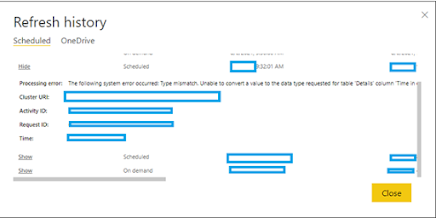
While scheduling refresh in Power BI, you might get below error . Issue: Unable to convert the value '<pii></pii>' from the source data type 'VT_BSTR' to the expected data type 'VT_I8 . Cause/Reason Behind: Column datatype mismatch between power bi desktop and power bi cloud report. Solution: Edit query in power bi desktop and change the data type so it’s in sync with Power BI service/cloud. Example: In my case, I have modified a column’s datatype from decimal to whole number (to display no. of days). Now power bi desktop and power bi service synced up and I could perform automatic data refresh.
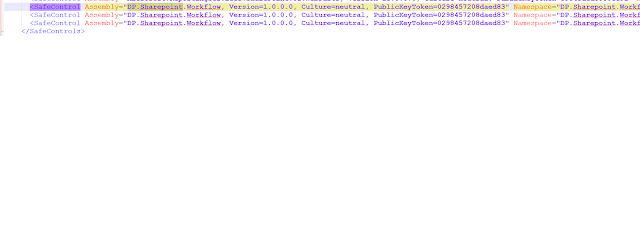
One of my SP 2016 application is using SPDActivities of Email extended feature of DP.SharePoint.Workflow to provide custom "From" address. But customers started to complain that they are not getting reminder emails anymore. Find below my STAR analysis, Situation : Recently I was facing an issue - Approval workflow failed to run. Customers not getting reminder emails anymore. Task : - Planned to look into SharePoint services, IIS site, web.config files (WFE and App Server), Latest patch/MS update/CU, Users permission. Analysis : Started looking into each below items, - SharePoint Timer Service and Administration services were running and good - Account which is running the workflow got required permission - DP.SharePoint.Workflow got activated for the web application - Checked into web.config file in WFE server and App Server for below sections Under <SafeControls> below 3 lines need to added both in WFE and App server web.config files, ...
Situation : Created a web application and chosen “Default zone” for Trusted Identify Provider authentication “iTrust” – (SAML Authentication) Note: Trusted Identity Provider Authentication enables federated users in this Web application. This authentication is Claims token based and the user is redirected to a login form for authentication. Issue: Site is working fine but “Search” didn’t work. When checked for the reason, found that the default zone should be windows authentication which makes ‘Search” work. Resolution: - - Need to create standard default zone windows authentication (Though this is not required – as the site created is for federated authenticated external users with SAML authentication). - - Then extend the windows default zone application into Trusted Identity provider “Extranet/Any available zone” site. Step1: Default zone windows authenticat...
ReplyDeleteTravel to India in air-conditioned comfort to visit one of the world's most iconic monuments. The Taj Mahal is probably the best known monument to love that was ever built.
GOLDEN TRIANGLE TOUR 3 DAYS 2 NIGHTS
GOLDEN TRIANGLE TOUR 4 DAYS 3 NIGHTS
GOLDEN TRIANGLE TOUR 5 DAYS 4 NIGHTS
GOLDEN TRIANGLE TOUR WITH AJMER PUSHKAR
GOLDEN TRIANGLE WITH RANTHAMBORE JAIPUR DELHI
TAJMAHAL SUNRISE TOUR
TAJ MAHAL SAME DAY TOUR
For more information
Thank & Regard
Vicky
Visit our website https://www.goldentajtours.com/
Email : goldentajtours2@gmail.com
phone : +919997349090, +919897070013,+918395877144