Posts

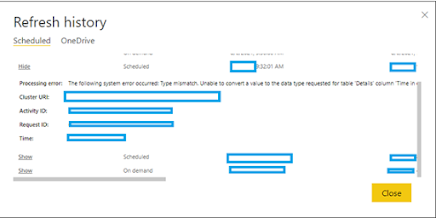
Power BI Refresh Issue: unable to convert the value '' from the source data type 'VT_BSTR' to the expected data type 'VT_I8.

Image
While scheduling refresh in Power BI, you might get below error . Issue: Unable to convert the value '<pii></pii>' from the source data type 'VT_BSTR' to the expected data type 'VT_I8 .     Cause/Reason Behind: Column datatype mismatch between power bi desktop and power bi cloud report. Solution: Edit query in power bi desktop and change the data type so it’s in sync with Power BI service/cloud. Example: In my case, I have modified a column’s datatype from decimal to whole number (to display no. of days). Now power bi desktop and power bi service synced up and I could perform automatic data refresh.
Volatile function error for SharePoint calculated field current date

  Today's Issue: Volatile function error for SharePoint calculated field current date While creating calculated column to find date difference, I encountered this error. Here I have provided the resolution to fix it, Create a  new column  called  Today  (Single line of text). Create a  calculated column , name it anything you want, say ' CurrentDate '. In the  formula , insert the column you created previously ' Today '. Set the data type to ' Date and Time '. Set the Date and Time format to ' Date Only '. You can even select Date & Time if you would want to use hours/minutes as well. Now  delete  the ' Today ' column you created in first step. Don't worry, just go ahead. Add the 'CurrentDate' column to your view and check the value. You should see today's date in there. Modify the formula as required, you can use the column Today just like the function [Today] without any issues. Same approach could also be used for [Me],...

Search not working in federated SAML authentication SharePoint site

  Situation : Created a web application and chosen “Default zone” for Trusted Identify Provider authentication “iTrust” – (SAML Authentication) Note: Trusted Identity Provider Authentication enables federated users in this Web application. This authentication is Claims token based and the user is redirected to a login form for authentication.   Issue: Site is working fine but “Search” didn’t work. When checked for the reason, found that the default zone should be windows authentication which makes ‘Search” work. Resolution: -          -   Need to create standard default zone windows authentication (Though this is not required – as the site created is for federated authenticated external users with SAML authentication). -           -  Then extend the windows default zone application into Trusted Identity provider “Extranet/Any available zone” site.   Step1: Default zone windows authenticat...

Office file not working for federated authenticated sites in SharePoint (SAML authentication).

  Situation After implementing “iTrust” – SAML authentication while creating external facing sites(DMZ Area) – office files didn’t work.   Task/Analysis Microsoft Office 2016 clients use modern authentication by default. In certain configurations, modern authentication isn’t supported by the Office 2016 clients with SharePoint Server 2016, such as when it is used for Active Directory Federation Services (AD FS) 3.0 installations. SharePoint administrators can now configure SharePoint Server 2016 to suppress modern authentication in Office 2016 clients .   Action To configure SharePoint Server 2016 to suppress modern authentication in Office 2016 clients, follow these steps to run Microsoft PowerShell commands in the SharePoint 2016 Management Shell:   When you install SharePoint Server 2016, the user account from which you ran the installation is granted the appropriate permissions to run Microsoft PowerShell cmdlets. If any users have not been...

Unable to deploy wsp pacakage - Timer job and cache issue

 Sometime back in my project , I couldn't deploy wsp packages anymore. After some analysis found there are lot of one time job were running and it was blocking wsp deplopyment. Here I have provided the steps to resolve it, -   In Central Admin checked in Farm Solution Management the status was stuck on Deploying​ -   Stopped the SharePoint Admin and SharePoint Timer services       -   Checked and found multiple One-time jobs​, deleted those using the scripts below: -           Get-SPTimerJob | where{$_.DisplayName -eq $null} | foreach-object {$_.Delete()}Get-SPTimerJob | where{$_.schedule.description -eq "One-time"} | ForEach-Object{$_.Delete()} -           Checked if the timer service is ON using the script -           $farm   = Get-SPFarm -           $disab...

SPDActivities - DP.SharePoint.Workflow - Workflow failed to run

Image
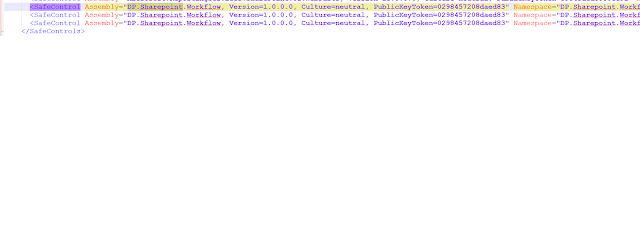
One of my SP 2016 application is using SPDActivities of Email extended feature of DP.SharePoint.Workflow to provide custom "From" address. But customers started to complain that they are not getting reminder emails anymore. Find below my STAR analysis, Situation : Recently I was facing an issue - Approval workflow failed to run. Customers not getting reminder emails anymore. Task : - Planned to look into SharePoint services, IIS site, web.config files (WFE and App Server), Latest patch/MS update/CU, Users permission. Analysis : Started looking into each below items,  - SharePoint Timer Service and Administration services were running and good - Account which is running the workflow got required permission - DP.SharePoint.Workflow got activated for the web application - Checked into web.config file in WFE server and App Server for below sections Under <SafeControls> below 3 lines need to added both in WFE and App server web.config files, ...

SharePoint Designer workflow restore previous version - Applies to SP versions - 2013,2010 and 2007

Image
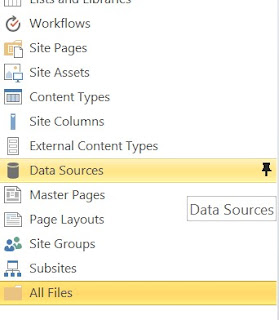
Today I got into a situation to restore the previous version of one of the SharePoint Designer 2010 workflows, created in SharePoint Designer 2013. 1.      In the left pane of SharePoint Designer, click the little pin icon next to  All Files . 2.      Now look for the folder Workflows on the right pane and look for your workflow. 3.      My situation was to restore a previous version of the workflow “Reminder Test. Select and expand it.  4.      Each of these files has a set of versions. Right click on the XOML file and choose  Version History . Select the version you would like to restore. (For my there is some problem in loading version history and so couldn’t provide the screenshot) 5.      Click  Restore . 6.      Right click on the next file, the XOML.rules. Go find that exact same date/time of the f...

Workflow Service: The HTTP request has timed out after 20000 milliseconds

Hello, I was dealing with this issue and getting errors like -  " Workflow Service: The HTTP request has timed out after 20000 milliseconds " and "Save cannot be performed and server cannot be reached". Resolution: Make sure the following services are restarted -               Service Bus Gateway               Service Bus Message Broker

Enabling SideLoading in SharePoint Online for Non-Developer Site

Image
Note 1:  By default this feature is enabled in “Developer Site”. So if your site has been created with the “Developer Site” template then do not use this article since this is for non-developer sites. Note 2:  Enabling this feature is not recommended for production sites. Sideloading apps is insecure. The main reason for blocking sideloading by default on non-developer sites is the risk that faulty apps pose to their host web/host site collection. Apps have the potential to destroy data and make sites or, given enough permissions, can even make site collections unusable. Therefore, apps should only be sideloaded in dev/test environments and never in production. ( Referenece:   Apps for Office and SharePoint blog ) Pre-requisites Install Windows PowerShell from Windows Management Framework (I installed the Windows Management  Framework 3.0 ). Then install “SharePoint Online Management Shell”  Link . Procedure Execute a PowerShell script in any desktop n...